

Release news Naviate for Revit
Naviate Structure December release news 2026 v26.2.0
Release news for Naviate Structure. Release includes the new features Multi-Rebar Presentation and Rebar Tick, and updates to Rebar Placement, BVBS Code and SOSI Import.
-
Feature
-
Feature
-
Update
-
Update
-
Update
-
Fix
This release news includes Naviate Structure 2026 v26.2.0 and are available on My Symetri -> Applications
Multi-Rebar Presentation
Presents one visible rebar across multiple sets without conflicts.
A new tool to simplify and accelerate the setup of rebar presentation in views. In Configure Reinforcement settings, you can define a minimum distance allowed between visible bars:
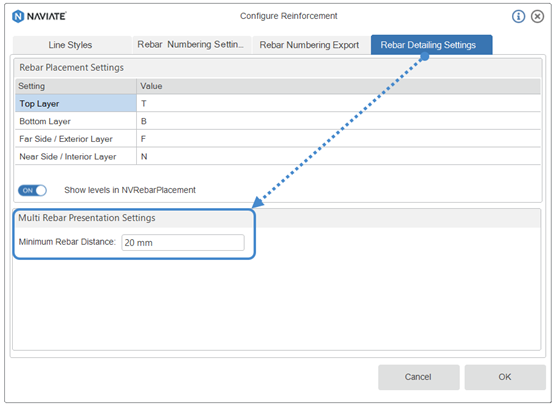
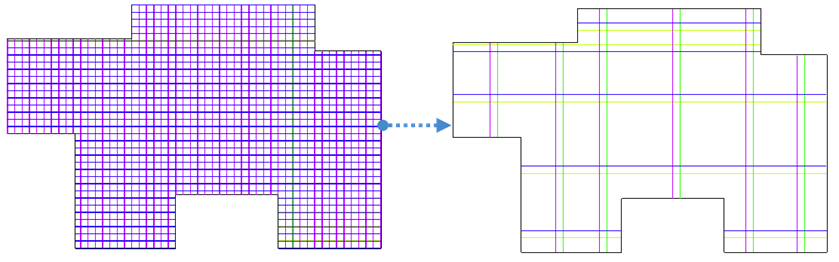
This tool allows quick (one-click) setup of a single bar displayed for all selected hosts/rebars or across the entire view, ensuring that visible bars do not overlap.
Rebar Tick (UK only)
Places a tick to indicate the rebar’s start and end positions.
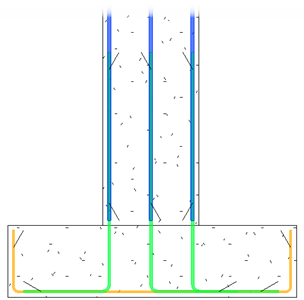
Reinforcement sections in the UK configuration now follow national standards by showing bars with 30° oblique tick marks:
- Ticks appear at both ends of reinforcement in section/elevation views.
- Only applied to bars parallel to the view (not stirrups/closed shapes).
- Oriented toward the inside of the element, depending on which level bar is placed.
This ensures clearer identification of bar starts, ends, and lap zones:
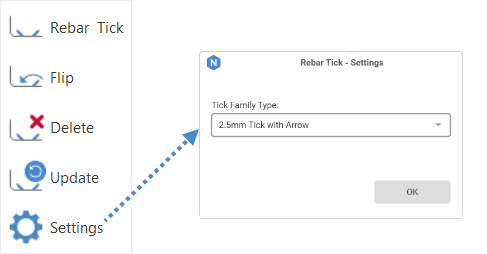
After creating ticks, there are additional options to help you achieve the desired placement:
- Flip - rotate the tick by 90° if the initial orientation is not suitable.
- Delete - quickly remove ticks from the ends of bars.
- Update - adjust tick positions automatically when bars are changed
- Settings - select which tick family type you want to use.
Rebar Placement Improvement
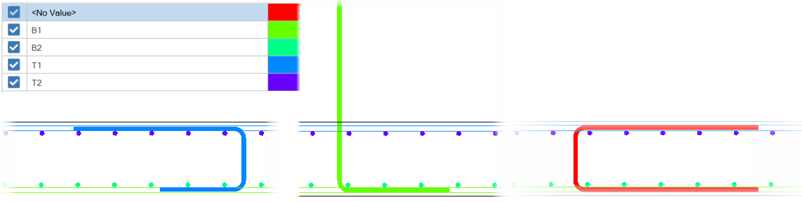
Now it is possible to detect rebar layers for all 2D rebar shapes.
Rebar placement now accounts for all 2D rebar shapes and their relationship to the host element, leading to more reliable and consistent placement results.
The layers for multi-segment rebar shapes are specified:
- When a single rebar segment is parallel to the host, that segment defines the rebar layer.
- When two parallel segments are found, the longer one determines the rebar layer.
- When two parallel segments have the same length, no layer is defined.
Update BVBS Code Improvements
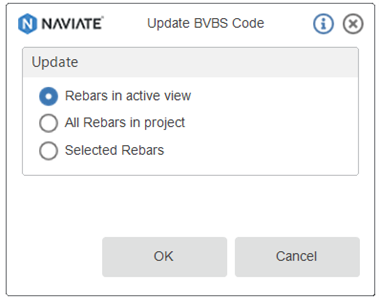
You can now update the BVBS code for rebars in the active view or for selected rebars only.
Now it is possible to choose either to update the BVBS code for all rebars in view or only for the preselected ones, or, as it was before, run the BVBS code update for all rebars in the project.
SOSI import (Norway only)
The SOSI import tool has been added to the Norwegian configuration, allowing you to import SOSI data directly into your project.
SOSI import is now available in Naviate Structure for the Norwegian configuration.
You can import SOSI files directly and continue working with them in your Revit project.
Fixes
- Top/Bottom Far/Near Symbols
- Fixed issues when the function stops working for multiple rebars in the view.
- New Rebar Numbering
- Duplicate rebar shape parameters are now treated as equivalent.
- Fixed issues related to grouping rebars when a parameter has no value.
- Fixed issues affecting varying multi-segment rebars.
- In workshare mode, when “Use All Rebars” is enabled, data from all partitions is displayed.
- New Rebar Numbering export to Excel Fixed an issue that occurred when the export template did not exist.
- Tag from Template Fixed an issue where rotated columns were not being tagged.