

Release news Naviate for Civil 3D
Naviate for Civil 3D 2026.26.2 Landscape release
Updates in Naviate Landscape for Civil 3D. Highlights include updates to Slope Pattern, Slope Arrow, Slope Arrow Settings and fixes.
Updates
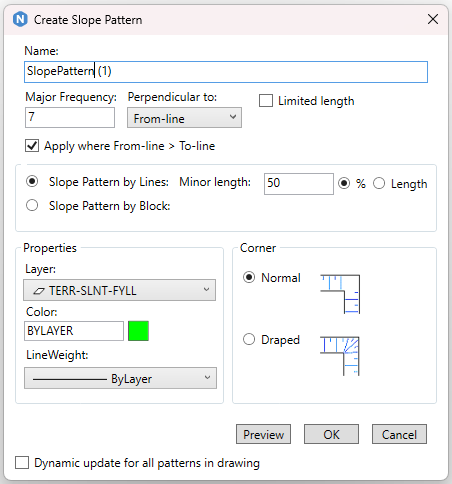
Slope Pattern has gotten several updates:
- When creating a Slope Pattern, a Frequency Line can be selected that is separated from the slope pattern lines. This enables for instance slope patterns on both sides of a road to use the same alignment as frequency line which means they will always be perpendicular to each other.
- In the dialog, which line the slope pattern should be perpendicular to is selected, if a separate frequency line has been selected, then the frequency line is available in the drop-down.
- Limited length can be set in the dialog to enable a slope pattern to only be drawn along a section of the selected lines.
- ‘Apply where From-line > To-line' can be used to only get slope pattern where the first selected line is at a higher elevation than the the second selected line. E.g. to create a Cut-slope pattern in one color and a Fill-slope pattern in another color. When using this option, after a cut-pattern is created, the command automatically asks if the fill-pattern should also be created.
Slope Arrow can now be created as arcs.
Slope arrow Settings has been updated with two new settings
- Slope Format can be set to Percent, Rise:Run or Run:Rise. Note that when setting slope in Rise:Run or Run:Rise, it is always the Run-value that is entered.
- Supplementing dist controls if triangle nodes should be added along the feature lines, and at what distance the nodes should be addded.

Fix
- Fixed an issue where Edit Elevations By Scroll Wheel didn’t edit the correct point when clicking close to another point. Also fixed an issue when using this command in an UCS.
- Fixed an issue where 3D Text didn’t create any solids if the labels didn’t contain a tick.